

IcyScreen 4.13
An automatic screenshot/screen capture program that can save, e-mail, and upload
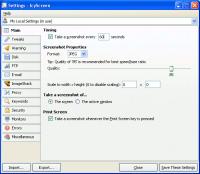
IcyScreen can take automatic screenshots and screen captures as often as you'd like, and not only save them to disk, but also e-mail them and upload them to your web server (via FTP) and ImageShack account.
Software Specs
Publisher:............ 16 Software
License:............... Demo
Price:................... $44.95
Expire: ................ 30
File size:.............. 4.24 MB
Downloads:.........
Release date:...... 15 Mar 2011
Last update:........ 28 Dec 2011
Language:............ English
Publisher review for IcyScreen 4.13:
Review by: 16 Software
IcyScreen is an automatic screenshot taker and automatic screen capture program. You can tell it how often you'd like a screenshot ("picture" of the computer screen) to be taken, and not only have the screenshots saved to disk, but also have them...
- E-mailed to an unlimited number of recipients, including yourself
- Uploaded to a web server, via FTP
- Uploaded to the free ImageShack hosting service
Configuration is quick and easy and can be completed in under three minutes. Then just click On and IcyScreen will handle the rest.
IcyScreen has enough features to satisfy even the most demanding of users, yet it's still easy to use.
Besides configuring exactly how often a screenshot should be taken and where the screenshot should be saved, e-mailed, and/or uploaded to, you can:
- Customize nearly every single aspect of the screenshot, including the file name, dimensions, image format/quality, etc.
- Choose exactly what to take a screenshot of: the entire screen (you can even select which monitors to include in the screenshot, as well as the areas that are extracted from each monitor) or the active window
- Forbid screenshots from being taken if the computer has been inactive or the screensaver is running
- Forbid screenshots from being saved, e-mailed, or uploaded if the screen has not changed since the last screenshot was taken
- Define a list of keywords that, when typed, "trigger" a screenshot, cause the timer interval to be adjusted, etc.
- Enable audible/visual warnings, so you know exactly when a screenshot is about to be taken
- Easily manage settings for multiple user accounts with the built-in central management capabilities
- Use the Print Screen key as a hotkey to trigger a screenshot
- Protect functionality with a password, prevent limited users from modifying the settings...
... and much, much more.
Requirements:
None.
Operating system:
Win2000,Win7 x32,Win7 x64,Win98,WinOther,WinServer,WinVista,WinVista x64,WinXP,Other
Release notes:
Minor Update
Whats new in version 4.13:
Fixed an error message that would appear after taking a screenshot on Windows 2000 in some cases.

IcyScreen screenshots:
IcyScreen download tags:
automatic screenshot automatic screen capture screenshot screen capture e-mail email FTP server upload ImageShack
Copyright information:
SPONSORED LINKS
Based on 2 ratings. 2 user reviews.